1. 在JS中混杂字符和HTML标签,识别方法
1
2
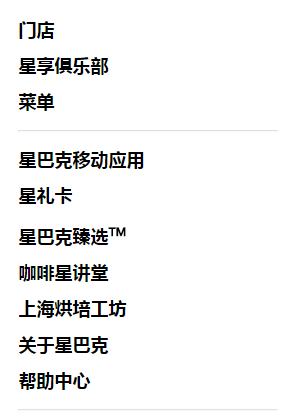
const menuList = ['门店', '星享俱乐部', '菜单', '<hr></hr>', '星巴克移动应用', '星礼卡', '星巴克臻选<sup>TM</sup>', '咖啡星讲堂', '上海烘培工坊', '关于星巴克', '帮助中心', '<hr></hr>'];
const listItems = menuList.map((item,index) =><li key={index} dangerouslySetInnerHTML={{ __html: item }}></li>);// dangerouslySetInnerHTML:将JS中的标签转化为HTML语言

使用了dangerouslySetInnerHTML的标签内不能再包含内容

效果:
reactContact

  1. 需要往标签里同时添加静态类和动态类
1
2
let menuhide = this.state.menuSwitch ? '' : 'hide';
<a className={['moremenu', menuhide].join(' ')}>菜单</a>{/* react拼接class的方法 */}

在数组中的menuhide是个变量,用join()方法将两个数组元素拼接起来,以空格‘ ’作为分隔符
阅读全文 »

  文档对象模型 DOM 用一个逻辑树来表示一个文档,树的每个分支的终点都是一个节点(node),每个节点都包含着对象(objects)。DOM的方法(methods)让你可以用特定方式操作这个树,用这些方法你可以改变文档的结构、样式或者内容。

  1. 创建Dom
1
2
const dialog = document.createElement('div'); // 一个标签
const textNode = document.createTextNode('hello world!'); // 一个文本节点
  1. 查找元素
1
2
3
4
5
const ele = document.getElementById('id');
const eleArray = document.getElementsByTagName('div');
const eleArray = document.getElementsByClassName('id');
const ele = document.querySelector('#id');
const eleArray = document.querySelectorAll('.id');
  1. 关系型查找
1
2
3
4
5
6
7
8
9
10
11
12
13
// 父元素/父节点
const parent = ele.parentElement;
const parent = ele.parentNode;
// 当前元素的第一个/最后一个子元素节点
const el = ele.firstElementChild;
const el = ele.lastElementChild;
// 下一个/上一个兄弟元素节点
const el = ele.nextElementSibling;
const el = ele.previousElementSibling;
// 返回当前节点的前一个兄弟节点,没有则返回null.
previousNode = node.previousSibling
// 返回其父节点的 childNodes 列表中紧跟在其后面的节点,如果指定的节点为最后一个节点,则返回 null。
nextNode = node.nextSibling
阅读全文 »

对象的属性类型

对象的属性有一些特性值,这些特征值是为了实现javascript引擎用的,所以是内部才用到的特性,用[[]]表示。
这些特性分为两种:数据属性和访问器属性

  1. 数据属性:可以读取或写入的值,有四个特性:
  • [[Configurable]]: 能否通过delete删除属性从而重新定义属性,能否修改属性的特性,或能否把属性修改为访问器属性。默认是true。一句话就是能否修改
  • [[Enumerable]]: 能否通过for-in循环返回属性,默认是true。是否可枚举
  • [[Writable]]: 能否修改属性的值。默认是true
  • [[Value]]: 包含这个属性的数据值。读取属性值就是读取的这个位置,写入也是。默认是undefined。

要修改上面这些特性,必须使用Object.defineProperty()方法,例如:

1
2
3
const obj = {
name: 'Jhon'
}
1
2
3
4
5
6
Object.defineProperty(obj, 'name', { // 特性为小写,大写开头无效
enumerable: false,
value: 'Alice'
})

console.log(obj.name) // Alice
1
2
3
4
5
6
7
8
9
10
11
Object.getOwnPropertyDescriptor(obj, 'name')
// {value: "Alice", writable: true, enumerable: false, configurable: true}

这些特性默认是true,但是如果采用
Object.defineProperty(obj, 'age', {
value: 18
})
得到的属性age,默认特性全部是false

Object.getOwnPropertyDescriptor(obj, 'age')
// {value: 18, writable: false, enumerable: false, configurable: false}
  1. 访问器属性:
  • [[Configurable]]: 能否通过delete删除属性从而重新定义属性,能否修改属性的特性,或能否把属性修改为访问器属性。默认是true。一句话就是能否修改
  • [[Enumerable]]: 能否通过for-in循环返回属性,默认是true
  • [[Get]]: 读取属性时调用的函数,默认返回undefined
  • [[Set]]: 写入属性时调用的函数,默认返回undefined
  • 设置getter和setter时不能同时设置数据属性Writable和Value
阅读全文 »

现象

今天工作时碰到一个需求,有两个数组arrayChild, arrayFather, 要求:
1、往数组arrayChild中放入一个元素;
2、将当前的数组arrayChild放入arrayFather中;
3、清空数组arrayChild,将一个新元素放进去;
4、将放了新元素的arrayChild放入数组arrayFather中。
刚开始是这么写的:

1
2
3
4
5
6
7
8
9
10
11
12
const arrayChild = [];
const arrayFather = [];

arrayChild.push(0, 1);
arrayFather.push(arrayChild);

arrayChild.splice(0);

arrayChild.push(3, 4);
arrayFather.push(arrayChild);

console.log(`arrayFather = ${arrayFather}`);
阅读全文 »

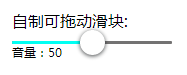
效果图

HTML结构

1
2
3
4
5
6
7
8
<div id="d2">
<p>自制可拖动滑块:</p>
<div id="out">
<div id="filling"> </div>
<div id="innerimg"></div>
</div>
<p id="txt">音量:0</p>
</div>

第一个div是轨道,第二个是填充物,第三个是滑块

CSS样式

阅读全文 »

H5自带进度条

1
2
3
4
<div id="d1">
<p id="pgv">进度:0%</p>
<progress id="pg" max="100" value="0"></progress>
</div>

运用progress标签,设置好min和max数值就好。可以用value获取其中的进度值

1
2
3
4
5
6
7
8
9
10
11
12
13
function staticProgress () {
var pg = document.getElementById('pg')
var pgv = document.getElementById('pgv')
var timer = setInterval(function () {
if (pg.value !== 100) {
pg.value++
pgv.innerHTML = '进度:' + pg.value + '%'
} else {
pgv.innerHTML = '加载完成'
clearInterval(timer)
}
}, 100)
}

最终效果如下:

阅读全文 »

  win7下拖动一个状态栏,可以看到整个对话框的边框变成了玻璃,待拖动到指定位置后松手,对话框就过去了

drag

我们在网页中实现一下:

drag

阅读全文 »

增删改查

1
2
3
4
5
6
7
8
9
10
String.prototype.replace(substr/regexp, newsubstr/function);  // 将字符串中的substr或正则匹配的字符串,替换成newsubstr或符合function的字符串
String.prototype.concat(str1, str2, str3...); // 将多个字符串连接在一起,建议使用+代替实现
String.prototype.slice(start, end); // 返回字符串中从start开始到end结束的字符串
String.prototype.charAt(index); // 返回指定index的字符,找不到返回空字符串
String.prototype.split(); // 将字符串按照指定字符分割成数组,字符串中无该数组时返回空数组,常与Array.prototype.join()一起使用,进行字符串与数组的转换
String.prototype.includes(str); // 查找字符串中是否有str字符,返回Boolean值
String.prototype.indexOf(); // 返回指定字符在字符串中第一次出现的的index,没有则返回-1
String.prototype.startsWith(searchStr, position); // 从position位置开始查找,字符串是否以searchStr开头,返回true/false
String.prototype.endsWith(searchStr, position); // 从position位置开始查找,字符串是否以searchStr结尾,返回true/false

填充字符串

1
2
String.prototype.padStart(length, padString); // 使用padString从原字符串左边开始填充字符串,填充长度是length。length小于原始字符串长度时不填充,length + 原数组的长度小于要填充的字符串时,截取padString的前几个字符串
String.prototype.padEnd(length, padString); // 使用padString从原字符串右边开始填充字符串
阅读全文 »
0%