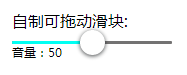
自制slider滑杆

效果图

HTML结构

1
2
3
4
5
6
7
8
<div id="d2">
<p>自制可拖动滑块:</p>
<div id="out">
<div id="filling"> </div>
<div id="innerimg"></div>
</div>
<p id="txt">音量:0</p>
</div>

第一个div是轨道,第二个是填充物,第三个是滑块

CSS样式

1
2
3
4
5
6
7
8
9
10
11
12
13
14
15
16
17
18
19
20
21
22
23
24
25
26
27
28
29
30
31
32
33
34
35
#out {/* 滑块轨道 */
position: relative;
width: 160px;
height: 12px;
margin-top: 10px;
margin-left: 0px;
border: 1px solid #28C561;
border-radius: 10px;
box-shadow: 1px 1px 2px 0px inset;/* 轨道内阴影 */
cursor: pointer;
}
#filling {/* 填充物 */
height: 100%;
margin-left: 0px;
width: 0px;
background: linear-gradient(to right, #0089ff , #00fff3); /* 填充效果的渐变 */
background: -webkit-linear-gradient(left, #0089ff , #00fff3);
background: -o-linear-gradient(right, #0089ff , #00fff3);
background: -moz-linear-gradient(right, #0089ff , #00fff3);
border-top-left-radius: 10px;
border-bottom-left-radius: 10px;
box-shadow: 2px -1px 5px 1px inset;
}
#innerimg {/* 滑块样式 */
position: absolute;
left: 0px;
top: -8px;
margin-left: 0px;
width: 25px;
height: 25px;
cursor: pointer;
background-color: #66F40E;
border-radius: 50%;
box-shadow: 0px 2px 1px 0px #0d11128a, 0px -1px 19px rgba(0, 0, 0, 0.9) inset; /* 使滑块具有3D感 */
}

JS代码

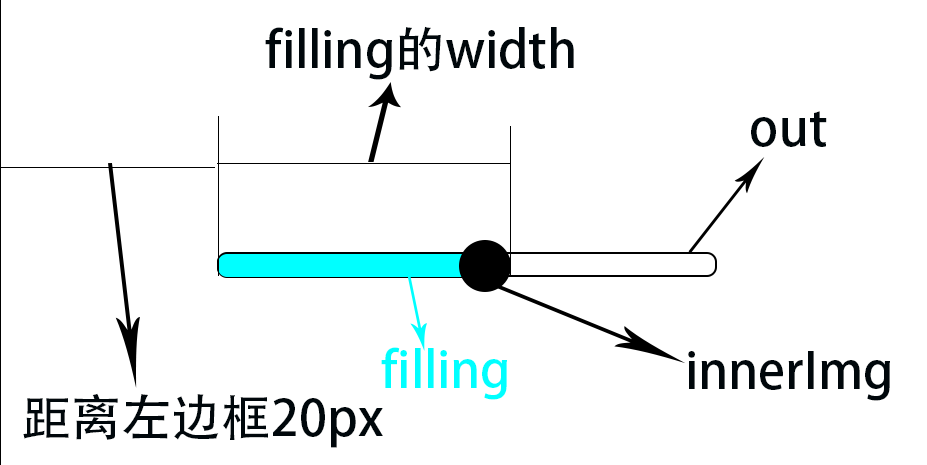
如图所示,将out设置为参考项,有两种情况:

  1. 点击out框的任何部位,滑块自动划过去并且filling填满滑块后面的地区
  2. 滑动滑块调节
    原理很简单:以out为参照,当点击out的任意部分时,将InnerImg的坐标更新到鼠标点击部位,将filling的width设置成鼠标点击部位与out左边框的距离,就可以到效果。
步骤:

先获取页面元素:

1
2
3
4
5
var innerpro = document.getElementById('innerimg')
var out = document.getElementById('out')
var filling = document.getElementById('filling')
var txt = document.getElementById('txt')
var target

添加out的点击事件:

1
2
3
4
5
6
7
8
9
10
11
12
/**
* @function dvnamicprogress -- 滑杆
* @description 添加事件
*/
function dvnamicprogress () {
if (document.addEventListener) {
/* addEventListener属性IE9.0才支持 */
out.addEventListener('click', fillingClick, false)
} else if (document.attachEvent) {
out.attachEvent('click', fillingClick, false)
}
}

当鼠标在out内点击时,获取鼠标位置,设置filling宽度和内部滑块innerimg的left

1
2
3
4
5
6
7
8
9
10
11
12
13
14
15
16
17
18
19
20
21
function fillingClick (event) {
event.stopPropagation()
if (event.touches) {// 兼容移动端,但是发现没有兼容ie8及以下……
target = event.touches[0]
} else {
target = event || window.event
}
var sliderLeft = target.clientX - 45 /* 减去的45=滑块的宽度25+整天滑杆距离视图左边框的距离20 */
var fillingWidth = target.clientX - 45
if (sliderLeft <= 0) {
sliderLeft = 0
}/* filling的宽度不能小于0,滑块的位置不能超出out左边界 */
if (fillingWidth <= 0) {
fillingWidth = 0
}
txt.innerHTML = '音量:' + parseInt(sliderLeft / 135 * 100)
innerpro.style.left = sliderLeft + 'px'
filling.style.width = fillingWidth + 5 + 'px'
// console.log('鼠标的位置:X=>' + target.clientX + ', Y=>' + target.clientY)
// console.log('滑块的位置:' + sliderLeft)
}

c). 添加移动滑块innerimg的事件

1
2
3
4
5
6
7
8
9
10
11
12
13
14
15
16
17
18
19
20
21
22
function dvnamicprogress () {
if (document.addEventListener) {/* addEventListener属性IE9.0才支持 */
out.addEventListener('click', fillingClick, false)
innerpro.addEventListener('touchstart', fillingMove, {passive: true}, false)
innerpro.addEventListener('mousedown', fillingMove, false)
} else if (document.attachEvent) {
out.attachEvent('click', fillingClick, false)
innerpro.attachEvent('touchstart', fillingMove, {passive: true}, false)
innerpro.attachEvent('mousedown', fillingMove, false)
}
}
function fillingMove (event) {
if (document.addEventListener) {/* addEventListener属性IE9.0才支持 */
innerpro.addEventListener('touchmove', sliderMove, {passive: true}, false)
document.addEventListener('mousemove', sliderMove, false)
document.addEventListener('mouseup', clear, false)
} else if (document.attachEvent) {
innerpro.attachEvent('touchmove', sliderMove, {passive: true}, false)
document.attachEvent('mousemove', sliderMove, false)
document.attachEvent('mouseup', clear, false)
}
}

当鼠标按下时给innerimg添加一个onmousemove事件,不断更新位置

1
2
3
4
5
6
7
8
9
10
11
12
13
14
15
16
17
function sliderMove (event) {
if (event.touches) {
target = event.touches[0]
} else {
target = event || window.event
}
// console.log('鼠标的位置:X=>' + target.clientX + ', Y=>' + target.clientY)
var prolong = target.clientX - 45
if (prolong < 0) {
prolong = 0
} else if (prolong > 135) {
prolong = 135
}
txt.innerHTML = '音量:' + parseInt(prolong / 135 * 100)
filling.style.width = prolong + 5 + 'px'
innerpro.style.left = prolong + 'px'
}

当鼠标按键弹起时,清除所有事件:

1
2
3
4
5
6
7
8
9
10
11
12
13
function clear () {
if (document.addEventListener) {
document.removeEventListener('mousemove', sliderMove, false)
document.removeEventListener('mousedown', fillingMove, false)
} else if (document.attachEvent) {
document.attachEvent('mousemove', sliderMove, false)
document.attachEvent('mousedown', fillingMove, false)
}
}
window.onload = function () {
staticProgress()
dvnamicprogress()
}